
IP Addresses and Related Knowledge
CREATED: 2026 / 05 / 03 Sun
UPDATED: 2026 / 05 / 03 Sun
ICANN and IANA
ICANN (Internet Corporation for Assigned Names and Numbers) is a non-profit international organization that manages and coordinates identifiers on the Internet. Its responsibilities include managing domain names (DNS), coordinating the allocation of IP address space, and managing protocol numbers. It was established in 1998; before that, IANA performed these functions under contract with the US government.
IANA (Internet Assigned Numbers Authority) is the body responsible for managing and coordinating number and name resources used on the Internet, and currently operates as a division of ICANN. It primarily manages the following three areas:
- Domain names: Management of the DNS root zone and top-level domains (TLDs)
- IP addresses: Management of the global IP address space and allocation to RIRs (Regional Internet Registries)
- Protocol numbers etc.: Management of standardized numbers such as port numbers and protocol identifiers
IP Address Management and Delegation
IANA is the top-level authority responsible for managing the entire global IP address space. However, IANA does not assign addresses directly to end users. Instead, it delegates management in large blocks to the world’s five RIRs (Regional Internet Registries).
| RIR | Region |
|---|---|
| ARIN | North America |
| RIPE NCC | Europe, Middle East, Central Asia |
| APNIC | Asia-Pacific |
| LACNIC | Latin America and the Caribbean |
| AFRINIC | Africa |
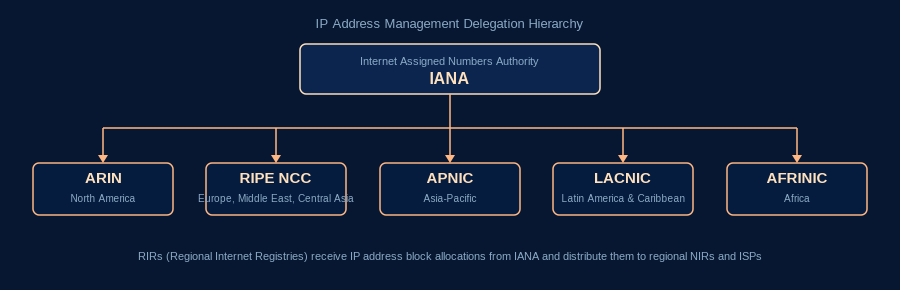
Japan falls under the jurisdiction of APNIC, and domestically JPNIC (Japan Network Information Center) receives allocations from APNIC and handles management within Japan.
IP address allocation follows a hierarchical structure like this:
IANA (global management)
  └─ RIR (regional management: APNIC, etc.)
       └─ ISP / NIR (national management: JPNIC, etc.)
            └─ End users (enterprises, individuals)
What Is an ISP?
An ISP (Internet Service Provider) is a business that provides Internet access services. Individuals and enterprises access the Internet using global IP addresses managed by ISPs.
ISPs are interconnected with each other on the Internet (peering), which enables communication with networks all over the world. In Japan, NTT, KDDI, and IIJ are among the most well-known ISPs.
Networks Between ISPs — AS and BGP
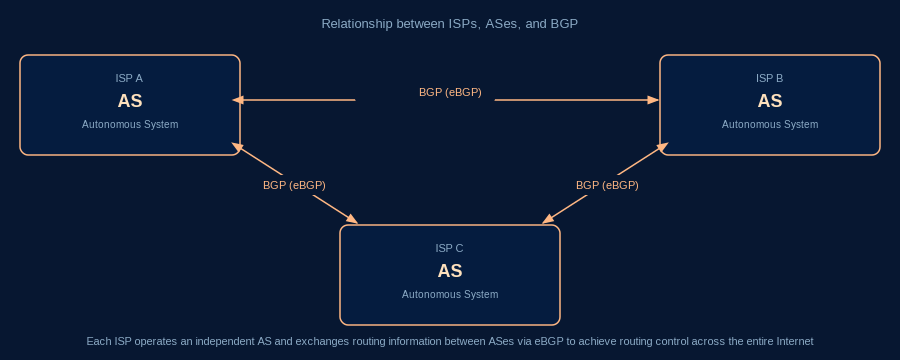
The Internet is not managed by a single organization; it is a collection of networks each autonomously managed by a different organization. These autonomous network units are called AS (Autonomous Systems). ISPs, large corporations, universities, and others each have their own AS, and each AS is assigned a globally unique AS number (ASN).
BGP (Border Gateway Protocol) is the protocol used to exchange routing information between these ASes. BGP exchanges path information — “which AS to go through to reach which address” — between ASes, enabling routing control across the entire Internet.
BGP has two types of communication methods (peering methods) depending on the scope of operation:
- eBGP (external BGP): Exchanges routing information between different ASes. ISP-to-ISP peering falls under this category and forms the core of Internet-wide routing control.
- iBGP (internal BGP): Synchronizes routing information between BGP routers within the same AS.
IPv4 and IPv6
IANA manages both the IPv4 and IPv6 address spaces.
IPv4 was the first to become widespread, and IPv6 was developed to solve the problem of IPv4 exhaustion.
IPv4
IPv4 (Internet Protocol version 4) is version 4 of the Internet protocol, still in wide use today.
It has a 32-bit address space, written as four 8-bit groups separated by dots in decimal notation, such as 192.168.0.1.
In theory it provides approximately 4.3 billion addresses, but reservations for specific purposes and management overhead reduce the number of actually usable addresses further.
Due to the rapid proliferation of the Internet, IPv4 addresses have become exhausted — the address pool managed by IANA is already depleted, and depletion is progressing at the regional RIR level as well. IPv6 emerged as the solution to this problem.
Global IP Addresses and Private IP Addresses
There are two types of IP addresses: global and private.
Global IP addresses are unique addresses on the Internet that can be reached directly from anywhere in the world. They are managed and allocated by IANA and RIRs, and provided to users via ISPs.
Private IP addresses are non-public addresses used only within a LAN. RFC 1918 reserves the following ranges as private addresses:
| Class | Address Range | Example Use Case |
|---|---|---|
| Class A | 10.0.0.0 – 10.255.255.255 | Large corporate networks |
| Class B | 172.16.0.0 – 172.31.255.255 | Medium-scale networks |
| Class C | 192.168.0.0 – 192.168.255.255 | Home routers, etc. |
Private IP addresses are not routed directly to the Internet, so they can be used freely within a LAN. A router uses NAT (Network Address Translation) to convert private IP addresses to global IP addresses, enabling devices on the LAN to communicate with the Internet.
CIDR (Classless Inter-Domain Routing) is an address assignment scheme that uses slash notation to indicate the length of the network portion of an IP address.
In 192.168.1.0/24, the /24 is the CIDR notation, indicating that the network portion is 24 bits long.
Previously, classful addressing with fixed-length classes — Class A (/8), Class B (/16), Class C (/24) — was used, but it was wasteful and lacked flexibility. CIDR allows the prefix length to be set arbitrarily, making it possible to allocate address blocks suited to the required scale.
In a private network, each subnet has the following three special addresses:
- Network address: The address where all host bits are 0. Used to identify the network itself and not assigned to any device. (e.g.,
192.168.1.0) - Broadcast address: The address where all host bits are 1. Used to send to all devices on the network simultaneously and not assigned to any device. (e.g.,
192.168.1.255) - Host addresses: The remaining addresses excluding the network address and broadcast address, assigned to devices such as routers and PCs. (e.g.,
192.168.1.1–192.168.1.254)
In a 192.168.1.0/24 network, 2 of the 256 addresses are reserved as described above, leaving 254 host addresses that can be assigned to devices.
Note that IP addresses are a concept handled at Layer 3 (the Network Layer) of the OSI reference model. To restate: global IP addresses are used for communication over the Internet (WAN), while private IP addresses are used for communication within an intranet (LAN).
IPv6
IPv6 (Internet Protocol version 6) is the successor protocol to IPv4.
It has a 128-bit address space, written as eight 16-bit groups separated by colons in hexadecimal notation, such as 2001:0db8:85a3:0000:0000:8a2e:0370:7334.
Its greatest feature is its practically inexhaustible address space of approximately 340 undecillion (3.4 × 10^38) addresses.
The main differences between IPv4 and IPv6 are as follows:
| Item | IPv4 | IPv6 |
|---|---|---|
| Address length | 32 bits | 128 bits |
| Address count | ~4.3 billion | ~340 undecillion |
| Notation | Dot-separated decimal | Colon-separated hexadecimal |
Since IPv4 and IPv6 cannot communicate directly, in today’s mixed environment, conversion technologies such as NAT64/DNS64 and dual-stack (holding both types of addresses) are used.
DNS
DNS (Domain Name System) is the mechanism that translates domain names into IP addresses.
Servers on the Internet are identified by IP addresses, but when a human types a name like example.com, the browser needs to resolve which IP address the request should go to.
DNS is responsible for this name resolution.
The Hierarchical Structure of DNS
DNS has a distributed hierarchical structure. At the top are root DNS servers, below which are servers for top-level domains (TLDs), and below those are authoritative DNS servers that manage individual domains.
Root DNS server (.)
  └─ TLD server (.com / .jp, etc.)
       └─ Authoritative DNS server (example.com, etc.)
The Name Resolution Flow
When accessing www.example.com in a browser, the IP address is resolved in the following order:
- The browser first checks the local DNS cache
- If not in the cache, it queries a full-service resolver (a DNS server provided by the ISP, etc.)
- The full-service resolver queries the root DNS server for the location of the TLD server managing
.com - It queries the TLD server for the location of the authoritative DNS server managing
example.com - It queries the authoritative DNS server for the IP address of
www.example.comand retrieves the result - The full-service resolver returns the IP address to the browser
By having the full-service resolver handle this recursive query process on behalf of the client, name resolution can be performed without the client needing to be aware of the complex hierarchy.
DNS Records
Authoritative DNS servers hold several types of records. The most common ones are shown below:
| Record Type | Role |
|---|---|
| A | Maps a domain name to an IPv4 address |
| AAAA | Maps a domain name to an IPv6 address |
| CNAME | Maps a domain name to another domain name |
| MX | Specifies the mail server for receiving email |
| NS | Specifies the authoritative DNS server for a zone |
| TXT | Holds arbitrary text information (e.g., SPF settings) |
LAN and WAN
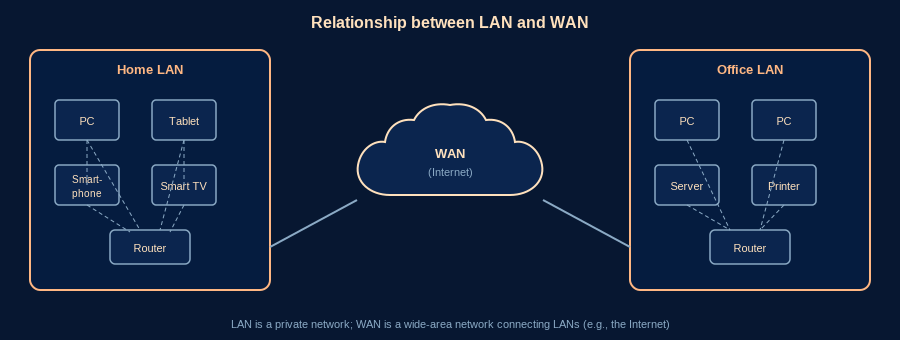
LAN (Local Area Network) is a network built within a limited area such as a home or company office. Devices are connected using routers and switches, and communicate using private IP addresses. Communication within a LAN does not go through the Internet, so it can be achieved at high speed and low cost.
WAN (Wide Area Network) is a wide-area network that connects geographically separated LANs. The Internet itself is a type of WAN, and when a company connects its offices via dedicated lines or VPN, that is also called a WAN.
Internet and Intranet
An intranet is a private network that is closed to the inside.
In other words, it is a term for the network within a LAN.
The Internet and intranet have similar names but serve different purposes:
| Internet | Intranet | |
|---|---|---|
| Access scope | Worldwide | Within a specific organization or home only |
| Address | Global IP | Private IP |
| Security | Public by nature | Internal only |
| Use case | General web services, etc. | Internal portals, internal systems, etc. |
When external access to an intranet is needed, a VPN (Virtual Private Network) can be used.
Unicast, Multicast, and Broadcast
There are three types of packet delivery methods within a LAN, distinguished by the scope of the destination:
| Method | Destination | Example Use Case |
|---|---|---|
| Unicast | A single specific host | Web browsing, file transfer, and most everyday communication |
| Multicast | A specific group | Video streaming, IPTV |
| Broadcast | All devices on the LAN | ARP requests, DHCP discovery |
Unicast is the most common communication method, delivering packets from one sender to one destination.
Multicast delivers packets only to devices that have joined a specific multicast group. Unlike broadcast, it avoids unnecessary load on unrelated devices.
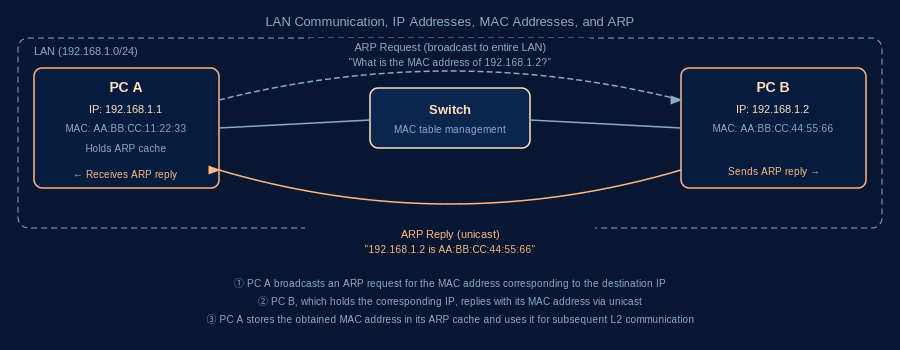
Broadcast sends packets to all devices within the same LAN. ARP requests, described below, are a prime example of broadcast — they ask every device on the LAN, “Which device has this IP address?”
Connections Within a LAN
Wired LAN (Ethernet)
Ethernet is the leading communication standard used for connecting to a network via wire. It was developed by Xerox in the 1970s and later standardized as IEEE 802.3. Today it is adopted not only in PCs and servers but also in home appliances, automobiles, and a wide variety of other devices.
The cables used for connection are mainly of the following two types:
- LAN cable (twisted pair cable): A copper wire cable most widely used in homes and offices. Easy to handle and inexpensive, making it well-suited for building private networks.
- Fiber optic cable: A cable that transmits data via light signals. Unaffected by electrical noise and capable of long-distance, high-speed communication, it is primarily used in data centers and backbone lines.
Ethernet is a standard covering Layer 1 (Physical Layer) and Layer 2 (Data Link Layer) of the OSI reference model. Being a wired connection, it is less susceptible to external interference than wireless LAN, achieving stable communication quality and security.
Wireless LAN
Wireless LAN is a network connection method that sends and receives data via radio waves without using cables. By installing a router or access point at home or in an office, multiple devices can connect to the LAN wirelessly.
The wireless LAN standard is formalized as IEEE 802.11, with speed and efficiency improving with each generation. Wi-Fi is a brand name from the Wi-Fi Alliance certifying the interoperability of products compliant with the IEEE 802.11 standard, and is not synonymous with wireless LAN itself.
The major Wi-Fi generations and corresponding standards are as follows:
| Generation | Standard | Max Speed | Frequency Band |
|---|---|---|---|
| Wi-Fi 4 | 802.11n | 600 Mbps | 2.4 / 5 GHz |
| Wi-Fi 5 | 802.11ac | 6.9 Gbps | 5 GHz |
| Wi-Fi 6 | 802.11ax | 9.6 Gbps | 2.4 / 5 GHz |
| Wi-Fi 6E | 802.11ax | 9.6 Gbps | 2.4 / 5 / 6 GHz |
| Wi-Fi 7 | 802.11be | Tens of Gbps+ | 2.4 / 5 / 6 GHz |
Characteristics differ depending on the frequency band used:
- 2.4 GHz band: Long radio range and good at penetrating obstacles, but prone to interference with other devices such as microwave ovens and Bluetooth.
- 5 GHz band: Less interference and suited for high-speed communication, but the signal attenuates more easily through walls and other obstacles.
From a security standpoint, because radio waves travel beyond physical barriers, encryption settings are critical. WPA3 is the latest encryption standard, and its adoption is recommended for compatible devices.
Like Ethernet, wireless LAN also covers Layer 1 (Physical Layer) and Layer 2 (Data Link Layer) of the OSI reference model.
MAC Address
A MAC address (Media Access Control Address) is a physical identifier assigned to a network interface (such as a NIC) at the time of manufacture.
It consists of 48 bits and is written as six 8-bit groups separated by colons in hexadecimal notation, such as 00:1A:2B:3C:4D:5E.
The first 24 bits are called the OUI (Organizationally Unique Identifier), a vendor identifier, and the last 24 bits are a management number assigned independently by the vendor. This MAC address is used for communication within the same LAN (L2 communication).
While an IP address is a logical address that can be changed, a MAC address is a physical address that is in principle fixed. The protocol used to resolve a MAC address from an IP address within the same LAN is ARP (Address Resolution Protocol). A node that wants to learn the MAC address for an IP address broadcasts an ARP request, and the node with the corresponding IP address replies via unicast. Using the MAC address obtained through this ARP mechanism, nodes on the LAN initiate L2 communication.
A MAC address is an identifier handled at Layer 2 (Data Link Layer) of the OSI reference model. While an IP address (Layer 3) handles routing between different networks, a MAC address handles device-to-device communication within the same LAN (Layer 2).
Appendix
- What is ICANN | JPNIC
- What is IANA | JPNIC
- Differences between IPv4 and IPv6 | AWS
- What is the difference between LAN and WAN? | AWS
- What is Border Gateway Protocol (BGP)? | AWS
- What is an Autonomous System (AS)? | Cloudflare
- Difference between Global IP Addresses and Private IP Addresses | Fortinet
- What is a MAC Address | NTT East
- What is WPA3? Differences from WPA2 and notes on deployment | HP Tech&Device TV
- What is ARP | NTT East
- What is an Intranet? | NTT PC Communications
- What is an RIR | JPNIC
- Relationship between JPNIC and RIRs | JPNIC
- IP Address Allocation Hierarchy | NTT
- What is the OSI Reference Model | Fujitsu Cloud Direct
- IP Address Management | JPNIC
- Internet 10-Minute Lecture: IPv4 Addresses | JPNIC
- How the Internet Works | JPNIC
- What is an AS Number | JPNIC
- How DNS Works | JPNIC
- Fundamentals of Domain Names and DNS | JPRS
- What is Ethernet? Types of cables and communication speed differences explained | I-O DATA
- Differences between Wireless LAN and Wi-Fi: From basics to security | gate02
- What is Wireless LAN? Differences from Wi-Fi and how it works, explained | eonet